Ask anyone who is actually built one of these for a living, and they will tell you the hard part was never just opening Google Analytics. It’s turning four or five browser tabs of numbers into one story a client will read past the first paragraph.
That’s really the whole job. A report only earns its keep if it answers three things: what changed, why it changed, and what happens next. Everything else — the charts, the logo in the header, the neat little executive summary — is packaging around those three answers.
This piece covers what an SEO report actually is, what belongs in a good one, why building them by hand turns into a monthly grind, and what changes once automation takes over the boring parts — without taking the analyst out of the loop.
What Is an SEO Report?
Here’s the plain version: an SEO report is a document that shows how a site performed in organic search over some stretch of time, usually a month. Traffic, impressions, clicks, keyword positions, maybe backlinks and a handful of technical flags — the exact mix depends on who’s asking and why.
That’s the dictionary answer, though, and dictionaries don’t run agencies. The version that actually matters is this: a report is only worth sending once somebody explains what those numbers mean. A spreadsheet full of percentages doesn’t tell a dentist or a SaaS founder whether their money is working. A person has to say so, in plain English, near the top.
A report turns search data into a progress update. Tie the metrics to something the client actually cares about, flag what changed, and leave them knowing what happens next. Skip that last part, and you’ve built a very nice-looking spreadsheet.
SEO report vs. SEO dashboard — people mix these up constantly
A dashboard just sits there, updating on its own. You open it Tuesday morning before a client call, or whenever curiosity strikes, and it shows whatever’s live right now. Nobody’s curated it for you.
A report is a different animal. Somebody looked at that dashboard, decided what actually mattered this month, and wrote it down with a point of view. Think of it this way: a dashboard is for checking in. A report is for making a call.
What Should an SEO Report Include?
No single template covers every campaign — a dentist’s office and a 200-SKU online store aren’t chasing the same numbers, and treating them the same is how reports end up ignored. Still, a handful of sections show up in almost every report worth a client’s time.
Organic traffic
Sessions or users, moving up or down — compared against last month, or last year if the business has a seasonal pattern worth mentioning.
Search visibility
Impressions, clicks, click-through rate, keyword movement — together, they tell you whether the site is showing up more, or quietly fading out of view.
The keywords that actually matter
Not two hundred rows nobody will read. The dozen or so queries tied to real business goals, and how they moved.
Landing pages
Which pages are pulling their weight, which ones are sliding, and where an hour of optimization work would actually move the needle.
Conversions and business outcomes
Wherever tracking allows it, tie organic traffic back to leads, purchases, or sign-ups — this is the section that actually justifies the invoice.
What happens next
Close with the actual plan. A client should finish reading knowing exactly what the team is doing next month, and why.
If there’s one rule worth keeping, it’s this: a metric earns its spot because it answers a business question — not because the tool happened to export it.
Why Manual SEO Reporting Takes So Much Time
One report on its own isn’t a huge deal. If things have been fairly quiet, you can probably get it done in twenty minutes or so. The problem is doing that same twenty minutes twelve times, for twelve different clients, all around the same Friday.
And the manual process usually isn’t quite as simple as it sounds. You jump into GA4, then Search Console, then a rank tracker. You export a few CSV files, copy everything into a spreadsheet that’s somehow still running on formulas from years ago, and inevitably end up fixing a chart that has decided to break again. Then there’s the commentary to write, the numbers to check one more time, and finally the report itself has to be put together in a way that actually looks presentable to the client.
None of that is hard, exactly. It’s just a lot of small handoffs — and every handoff is a chance for something to slip. A wrong date range here, a value pasted into the wrong cell there. Small stuff, individually. Add it up across a dozen clients and it stops being small.
“I got pretty good at spotting my own mistakes — mostly because I’d made every single one of them by month three. A date range from the wrong quarter. A chart still showing last client’s numbers because I forgot to refresh it. Nobody catches that stuff at 11 PM on a Friday.”
- Log into several platforms, every single cycle
- Export or copy data by hand, again and again
- Rebuild spreadsheets and charts that keep drifting
- Rewrite near-identical commentary for each client
- Burn time double-checking formatting and date ranges
- Connect the data sources once, not every month
- Pull fresh numbers on whatever schedule you set
- Fill a report structure that never breaks or drifts
- Generate a first-draft summary for someone to review
- Run a quality check before anything reaches a client
“Automation isn’t there to replace the strategist. It’s there to replace the copy-pasting around the strategist.”
What Is Automated Client Reporting, Actually?
Strip away the buzzword, and automated client reporting just means the data sources are wired up once, and the report builds itself from there — nobody’s opening a blank spreadsheet on the first of the month wondering where to start.
In practice: connect the platforms, define what the report should include, set a schedule, and let the system do the assembly. A person still opens it before it goes out. That part doesn’t disappear.
And that’s really the whole point. Automation should erase the repetitive prep work, not the judgment behind it. Someone still has to notice that traffic dipped for a weird reason, or that a competitor just launched a campaign worth mentioning. A system can’t do that part — not yet, anyway.
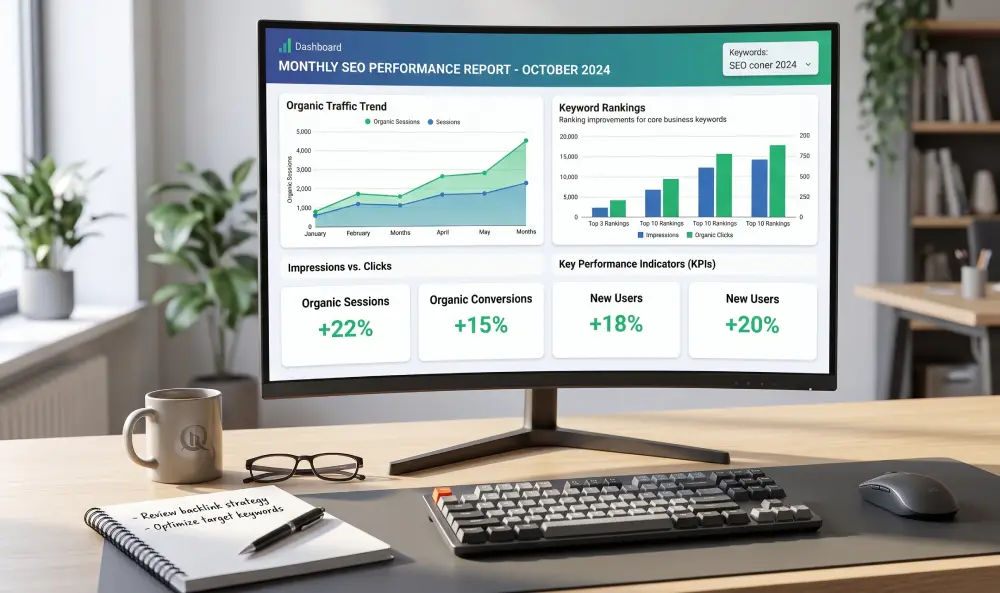
Wire the data up once, and the report builds itself — leaving the actual thinking for a human.
How to Automate SEO Reporting, Step by Step
Nobody automates their whole workflow overnight, and trying to usually backfires. Pick apart the repetitive steps first, standardize them, then add automation wherever it actually saves real time — not just wherever it sounds impressive on a slide.
Figure out what the report actually needs to answer
Start with the client, not the tool. What do they actually want to know? Decide that before touching a single data source.
Pick your data sources
Connect whatever holds the numbers you need — GA4, Search Console, ad platforms, a rank tracker. Usually two or three, rarely more.
Build one template you’ll actually reuse
Lock in the sections, the branding, the chart styles. The goal is a foundation nobody has to rebuild from scratch next month.
Let the system handle the data grunt work
Pulling the latest numbers and running the same calculations every month is exactly the kind of task nobody should be doing by hand in 2026.
Add commentary that actually says something
Surface the changes worth mentioning, draft the explanation, then have a person read it before it ships. Skipping that last step is where things go sideways.
Run one last check before it leaves the building
Date range right? Data fresh? Anything look weirdly off? Thirty seconds now saves an awkward email from a client later.
Automation doesn’t fix bad data — it just delivers it faster. A broken connection or a mis-tagged goal will happily produce the same wrong number, right on schedule, every single month, until someone actually checks.
When Should an Agency Bother Automating This?
Not every agency needs this on day one, and that’s fine. But a few warning signs tend to show up long before anyone admits the current process is a problem:
- Reports eat a genuine chunk of hours, every single cycle
- The same numbers get copied into three different documents
- Every account manager’s report looks a little different — and not in a good way
- Clients have started asking where their report is
- Reporting keeps stealing time from actual strategy work
- Signing one more client means signing up for one more manual grind
- You’ve already sent a report with the wrong month in it, at least once
Recognize two or three of those? The problem probably isn’t that your team needs to move faster. It’s that the process was never built to scale past four or five clients in the first place.
Making the Automated Version Actually Good
Automating a bad report just gets you a bad report faster. A few habits separate reports clients actually open from ones that quietly pile up unread.
Resist the urge to add more metrics
More numbers rarely means a better report — usually the opposite. Pick the handful that actually help someone make a decision, and leave the rest for the dashboard.
Give numbers context, not just a chart
“Traffic went up 12%” means almost nothing by itself. Up from what? Compared to when? Is that normal seasonal noise, or something worth digging into? Say so.
Keep the facts and the opinions separate
Let the data show what happened. Let the commentary explain why it probably happened, and what the team’s doing about it. Blur those two together and clients stop trusting either one.
End with something to actually do
Every report should close with a short, specific list of what’s next. Otherwise it’s just a monthly formality — a document nobody’s waiting for.
Spend less time assembling reports
RaiseReturn connects GA4, Google Ads, Meta Ads, Search Console, and PageSpeed to automate recurring client reporting and produce branded reports with plain-English summaries.
Start Your Free Trial →Frequently Asked Questions
A good SEO report was never supposed to be a data dump, and it wasn’t supposed to be a box-checking exercise either. At its best, it’s a short, honest answer to one question: is this working, and what’s the plan from here?
For most agencies, the next real upgrade isn’t a new tactic. It’s fixing the reporting process itself — so the time that used to go into copy-pasting spreadsheets goes back into the work that actually moves a client’s numbers.